 Screzy
Scroll easy. Flick to coast. Steer with mouse or rollerbar.
Easy, smooth mouse-wheel scrolling for every Windows app.
Free and open source, for Windows 10 and 11.
What changes when you scroll
A normal wheel moves the page in instant jumps. Screzy spreads each click over a short, eased glide, timed to your screen's refresh rate. The curves below show scrolling speed over time.
Each click glides
Instead of an instant jump (dotted), each click eases in and out. Clicks in a row blend into one steady movement.
Spin faster, go further
Roll quickly and each click covers more ground, so long pages fly by. Slow, careful scrolling stays precise.
Flick, and it coasts
Flick the wheel and let go: the page keeps moving and slowly runs down, like on a phone. Wheel clicks speed it up or slow it down while it coasts. A click stops it without clicking anything underneath.
- Per-app rules: give an app its own speed, or turn smoothing off for games
- Touchpads, Ctrl + wheel zoom and sideways scrolling are left alone
- Uses no CPU while you're not scrolling
- Lives in the tray; the icon turns grey when smoothing is off
- RollerMouse friendly: steer a coast's speed with the rollerbar
- Set a top speed for coasts, or let them run until you click
Tuned to your hand in one window
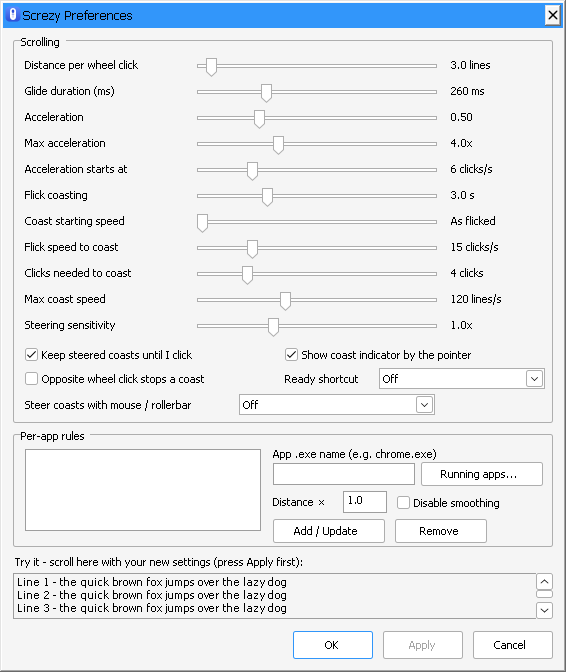
Set how far each click scrolls, how long a glide lasts, how strongly it accelerates, how far and how fast a flick coasts, and whether the rollerbar steers it. A test area lets you feel each change before you keep it.
For the smoothest result
Set Windows' Lines to scroll at a time to 1 (Settings → Bluetooth & devices → Mouse), or 3 if you prefer, then adjust the distance in Screzy. High Windows values turn small glide steps into visible jumps.
Nothing leaves your PC
Screzy never connects to the internet. It has no accounts, ads or analytics. It reads only the mouse input it needs, at the moment you scroll. Your settings stay in one small file on your computer.
Free and open source
Screzy is plain C with no dependencies, published under the MIT License. Read the code, build it yourself, or suggest improvements on GitHub.